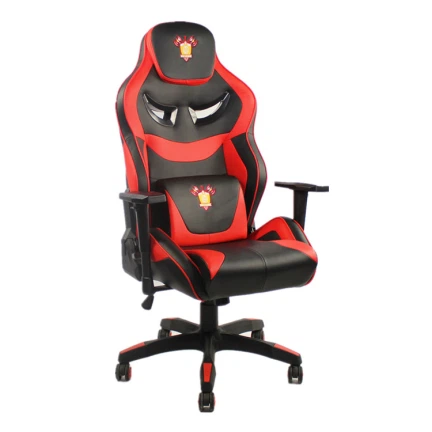

How to Adjust a Rocker Gaming Chair Backrest: The Complete Ergonomic Guide
The backrest angle is one of the most important - and most misunderstood - settings on any gaming chair. Here is how to adjust it correctly, fine-tune it for your body, and keep your spine happy through the longest sessions.
If you have ever spent hours grinding your favorite game or binging a late-night stream, you know exactly how much a comfortable chair can make or break the experience. The backrest angle is where that comfort starts. Set it correctly, and your spine keeps its natural curve, your shoulders stay relaxed, and you can play far longer without a stiff back. Set it wrong, and even a premium chair will leave you sore within an hour.
In this guide, we walk through how to adjust a rocker gaming chair backrest step by step - from identifying your chair's adjustment mechanism to fine-tuning lumbar support and troubleshooting the most common problems. Whether you are a casual player, a streamer, or a retailer choosing chairs for your customers, the same ergonomic principles apply.
Before You Adjust: Know Your Chair's Mechanism
Rocker gaming chairs are not basic desk chairs. They are designed to move with you - lean in to nail a shot, or lay back to reset between matches. That flexibility comes from an adjustment mechanism, and not every rocker uses the same one. Most models fall into one of these three categories:
Standard rocker models - a lever under the front edge of the seat, within easy reach of your left or right thigh while seated.
Racing-style rockers - a lever mounted on the side of the seat, closer to the base.
Comfort-oriented rockers - a small twist knob under the seat instead of a lever; a few newer designs use a quick-release button.
If you still have the manual, it is the fastest reference. If you tossed it with the box (most people do), just sit in the chair and feel under the seat - the control is usually obvious within seconds. Our rocker gaming chair line is built around the lever-under-seat layout, while racing chair for PS4 models place the lever on the right side, and comfort gaming chairs often use the twist-knob style.
How to Adjust the Backrest Angle: Lever Models, Step by Step
The lever-under-seat setup is the most common, and adjusting it takes about ten seconds once you know the motion:
Sit all the way back with your feet flat on the floor (or on a footrest if you are tall). Keep your core relaxed, not tight - posture matters because a chair set to a perfect angle still strains your back if you are slouching while you adjust it.
Reach down and grip the lever firmly. A solid, steady pull is all you need - no yanking.
While holding the lever, slowly lean back to the angle you want. Use the activity-based recommendations below as a starting point.
Release the lever. The backrest should lock into place. If it slides back after you let go, the lever was not pulled fully - try again with a firmer pull.

| Activity | Recommended backrest angle |
|---|---|
| Fast-paced FPS or competitive play | 90–100 degrees - upright for quick reactions |
| Story games, streaming, or breaks | 110–130 degrees - relaxed but supported |
| Racing and immersive titles | Around 110 degrees - the screen feels like it wraps around you |
| Napping or full recline |
Not recommended - rocker chairs are not built for 180 degrees, and forcing it can damage the mechanism |
Pro tip: never push a rocker chair to a flat 180 degrees. Rockers are designed for active sitting, not sleeping, and repeatedly forcing a full recline will wear out the lock mechanism over time.
Adjusting a Twist-Knob Rocker Chair
Twist-knob models - common on classic gaming chair styles - are even simpler. Sit back in the chair, twist the knob clockwise to loosen the tension, lean to your desired angle, then twist counterclockwise to lock it. No levers, no fumbling; the whole adjustment takes a few seconds and can be redone as often as you like.
Fine-Tune for Your Body: Lumbar, Shoulders, and Weight Distribution
Setting the angle is only half the job. Plenty of people adjust the recline and still wonder why their back hurts - usually because they skipped the fine-tuning. Three small checks make the difference:
1. Lower back support. Your lower spine should press firmly into the backrest, with no gap behind the curve of your back. Most rocker chairs ship with a padded lumbar pillow that slides up or down - position it so it fills the natural curve of your spine. On high-back gaming chair models, the lumbar support is adjustable with a strap, so you can cinch it tight to close any gap.
2. Shoulders and armrests. Your shoulders should never be hunched up near your ears. If leaning back makes your shoulders tight, sit up slightly, lower the angle by about 10 degrees, and adjust the armrests so your elbows rest at a 90-degree angle while holding a controller or keyboard. Arms at 90 degrees keeps your shoulder blades relaxed and takes the strain off your neck.
3. Weight distribution. When you recline, keep your weight fully on the seat pan - not perched on the front edge. A rocker's base is engineered to carry your full weight, and leaning while perched forward can make the chair tip or stop the backrest from locking cleanly. Test it: shift your weight back and forth gently. If the chair feels stable, you are set. If it wiggles, re-engage the lever and adjust again.

Troubleshooting Common Backrest Problems
Even well-built chairs develop quirks over time. Here are the three issues we hear about most, and how to fix each one:
| Problem | Cause and fix |
|---|---|
| Backrest won't lock | The lever was not pulled all the way. Sit back, pull it as far as it goes, lean to your angle, then release. If it still will not lock, debris or snack crumbs may be blocking the mechanism under the seat - wipe it out with a dry cloth. |
| Chair leans back on its own | Usually a loose adjustment knob. On twist-knob models, tighten it slightly. On lever models, use the small tension adjustment under the seat - turn it clockwise to make the recline stiffer. |
| Backrest is too hard to recline | Tension is set too high. Loosen the tension knob, or pull the lever and lean back gently. If it stays stiff, check the hinges where the back meets the seat - wipe them clean and apply a very light coat of lubricant (sparingly, so it does not stain clothing). |
Why the Right Backrest Angle Matters More Than You Think
Adjusting a chair angle sounds trivial, but after years in the furniture business, we can tell you: bad chair posture produces a cascade of small pains that quietly add up. A correctly set backrest keeps your spine in its natural S-curve, takes pressure off your spinal discs, and lets you stay in the game longer without distraction. It is not just comfort - it is long-term health, whether you play, stream, or work from the same chair.
There is also a genuinely fun side to rocker chairs: unlike fixed desk chairs, they move with you, so you can retune the angle to the activity. Rhythm games call for a forward 90 degrees; racing titles reward a reclined 110 degrees that pulls the screen around you. On racing chair for PS4 models, that adjustability is part of the immersion itself.
Choosing the Right Rocker Gaming Chair for Your Setup
Not every gamer needs the same chair. The good news is that the modern market has a style for every use case:
Rocker gaming chairs - the all-round choice, balancing support and mobility for daily play.
Comfort gaming chairs - extra padding for long stream marathons and all-day sessions.
High-back gaming chairs - full neck and shoulder support for taller players.
Classic gaming chairs - timeless styling with straightforward twist-knob recline.
Racing chairs for PS4 - console-focused designs that match the vibe of your setup.
For Overseas Buyers: Sourcing Gaming Chairs That Hold Up
If you are a distributor, esports organization, or retailer buying gaming chairs in bulk, the quality of the recline mechanism is exactly what decides whether the chairs you sell keep their reputation. A backrest that will not lock, or a chair that sags after a few months, is the fastest way to earn returns and negative reviews. That is why sourcing from a factory that designs and controls its own chair mechanisms matters more than the label on the box.
Zhejiang Zhenxing Furniture Technology Co., Ltd. is a professional manufacturer of chairs and chair parts with over 14 years of experience, based in Anji County, Zhejiang Province, China - a region known as the hometown of bamboo products and office chairs. Its 3,000-square-meter factory houses dedicated design, production, quality-control, and sales teams, enabling one-stop procurement of office furniture and chair components, including the gas springs, armrests, bases, casters, and lock mechanisms that power reliable backrest adjustment.
30+ countries served worldwide
50 containers shipped per month
20,000 chairs shipped monthly
3 years product warranty
Every year the company releases new products, and OEM and ODM programs are available for buyers who want their own branding, specifications, or custom features. With export experience across Europe, the USA, the UK, Brazil, Japan, and Korea, and a 3-year warranty on product quality, Zhenxing is built for long-term partnerships - whether you need a rocker for PS4, a comfort chair for streaming, or a full container mix of styles. For bulk purchases, custom deals, or samples, get in touch with the team - because a chair that plays comfortably is a chair your customers will stay in for years.